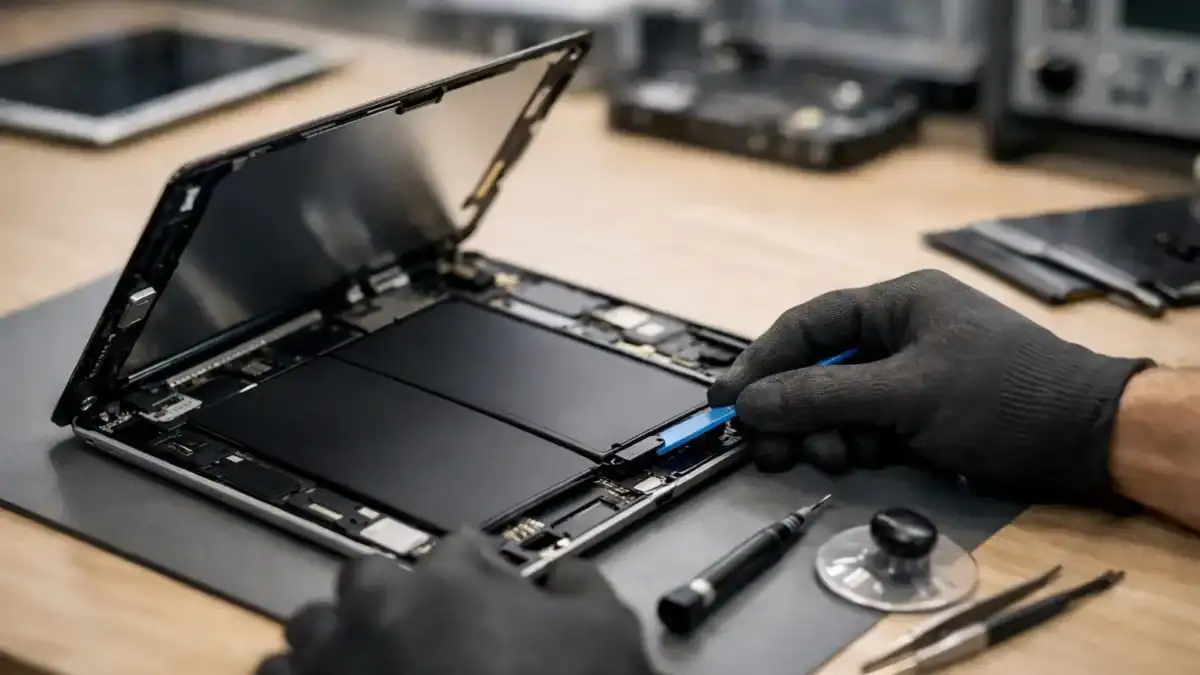
A customer brings in an iPad that falls from 40% to 5% during a video call, takes most of the day to charge, and has started lifting at one corner. Can iPad batteries be replaced? Yes. On most iPad models, the battery can be replaced, but it is a bonded internal repair rather than a quick-access component swap. The model must be identified correctly, the display removed without damage, and the replacement battery matched to the exact generation.
For repair shops, refurbishers and technically capable owners, battery replacement can extend the working life of an otherwise sound tablet. The practical question is not simply whether it can be done. It is whether the iPad’s condition, value and repair risk make it worthwhile.
Can iPad Batteries Be Replaced on Every Model?
Apple has used integrated lithium-ion batteries across the iPad range, including standard iPad, iPad mini, iPad Air and iPad Pro models. These batteries are not designed to be removed from the outside. They sit beneath the display assembly and are secured to the internal frame with strong adhesive.
That means replacement is possible on older and newer models alike, but the process varies substantially. Some iPads open from the front with a laminated display that requires controlled heat and careful cutting around the perimeter. Others use display assemblies with different cable positions, bracket arrangements and adhesive layouts. iPad Pro repairs can add further complexity due to their thinner chassis, higher-value screens and tightly packed internal components.
A battery labelled for an iPad Air is not automatically suitable for every iPad Air generation. Even devices with similar names can use different battery shapes, connector configurations and capacities. This is why repair parts should always be sourced by exact model family and generation, not by appearance alone.
When Is an iPad Battery Replacement Worth Doing?
Battery degradation is normal. Lithium-ion cells lose capacity with charge cycles, age and heat exposure. A battery replacement is usually worth considering where the iPad is otherwise functioning well and the repair cost is proportionate to the device’s resale value or business use.
Common signs include noticeably shorter run time, random shutdowns, slow charging, a battery percentage that drops unpredictably, or an iPad that becomes unusually warm during light use. A battery can also be the cause when a device only works reliably while connected to power.
Swelling is different. If the screen is separating from the frame, the chassis is bowed, or the display is lifting without obvious impact damage, stop charging the iPad and treat it as a priority repair. A swollen lithium battery can damage the display, flex cables and housing. It should not be pressed back into place or punctured during removal.
There are situations where a battery replacement may not be the best commercial option. If the iPad also has a cracked display, charge fault, liquid damage, board-level issue or major housing damage, the combined repair price may exceed the value of the unit. For a refurbisher, assessing all faults before ordering parts avoids tying stock and labour into an uneconomic device.
Identify the Exact iPad Before Ordering
Correct identification is the first part of a successful battery repair. iPad naming is easy to confuse because Apple reuses product names across several generations. An iPad 10.2-inch, for example, is not a complete identification on its own.
Check the model number from the device settings where possible. It can also be found on the rear housing of many models, although wear, housings and prior repairs can make this less reliable. The model number normally begins with the letter A followed by four digits. Match it against the full device generation, screen size and connectivity version before selecting a replacement battery.
For trade workflow, record the following on the job sheet before parts are picked:
- Exact iPad model number and generation
- Wi-Fi or cellular variant where relevant
- Existing faults beyond battery performance
- Whether the display has previous damage or replacement history
- Battery reference and connector layout required for the repair
The screen size, home button presence and camera arrangement are useful visual checks, but they should support model-number confirmation rather than replace it. Ordering a near-match battery can result in an incompatible connector, incorrect fitment or an unusable repair bay slot.
What the Repair Involves
iPad battery replacement requires more than removing a few screws. The display is normally bonded to the frame, so controlled heat and suitable opening tools are used to soften and cut the adhesive. Excess force can crack the glass, damage the LCD or OLED panel, or tear display flex cables.
Once the display is lifted safely, the battery connection should be isolated before work continues. Internal shields, screws and brackets need to be kept organised by position. Screw lengths can vary, and fitting an incorrect screw into the wrong location can damage the board or display assembly.
The battery itself is usually the most demanding stage. Adhesive strips or large adhesive pads hold the cells firmly to the housing. The safe approach is gradual, controlled release. Levering aggressively beneath a lithium cell risks bending or puncturing it. If the battery is swollen, removal becomes more delicate and may require additional time.
Before sealing the device, test charging behaviour, power-on function, touch response, display quality, cameras, speakers and any features disturbed during opening. A new adhesive seal should be applied to secure the display correctly. Reusing old perimeter adhesive can leave the screen poorly seated and more vulnerable to dust ingress or lifting.
Choosing a Replacement Battery for Repair Work
For a repair to be commercially sound, the replacement battery needs to fit accurately and perform consistently. Capacity claims alone do not tell the full story. A battery with the wrong dimensions, poor connector fit or weak cell quality creates avoidable returns and repeat labour.
Select a battery listed specifically for the device generation. Check the product specification, battery part reference where provided, included flex arrangement and whether the item is supplied with adhesive. For a workshop handling regular tablet repairs, keeping model-specific stock for high-volume iPads can reduce turnaround time, but older or less common models are often better ordered per job.
At iParts4U, model-led parts categories are designed to help technicians source components by the actual iPad generation rather than broad device naming. This matters particularly for batteries, displays and charge ports, where small compatibility differences can stop a repair from being completed.
Battery quality also affects customer confidence. A replacement should restore dependable everyday use, but no lithium battery should be presented as permanent. Usage patterns, charging habits, operating temperature and the age of the iPad all affect long-term battery life.
Repair Risks to Consider Before Quoting
A clear quote should account for more than the battery itself. The main risk is display damage during opening, especially where the glass is already cracked or the panel has been fitted previously with excessive adhesive. On certain models, the cost of a replacement display can change the economics of the whole job.
It is also worth checking the charge port and charging cable before diagnosing a battery fault. A worn port, damaged cable, unsuitable power adaptor or software issue can mimic poor battery performance. If charging is intermittent, inspect for debris and test with known-good equipment before committing to a battery replacement.
For consumer repairs, explain that opening an iPad can affect any remaining manufacturer warranty and that the device may not retain its original factory seal. For trade repairs, document pre-existing screen cracks, bent housings and touch faults with photographs or notes before work starts. It keeps the job transparent and protects both the technician and customer.
Safe Handling and Disposal
Removed lithium-ion batteries must not go into general waste. Store them away from heat and metal objects, protect exposed contacts where appropriate, and use an approved battery recycling route. A damaged or swollen cell should be isolated carefully and handled under the workshop’s battery safety procedure.
Never attempt to flatten, bend, puncture or dismantle an old iPad battery. The time saved by forcing a difficult removal is not worth the fire risk, device damage or potential injury.
A correctly matched replacement battery can give a reliable iPad several more useful years, particularly where the display, charging system and main board remain in good condition. Start with accurate model identification, inspect the complete device before quoting, and treat the bonded battery removal as the specialist repair it is.